Stremio Origin on LG TVs
From the Homebrew Channel. The app itself does not need root.
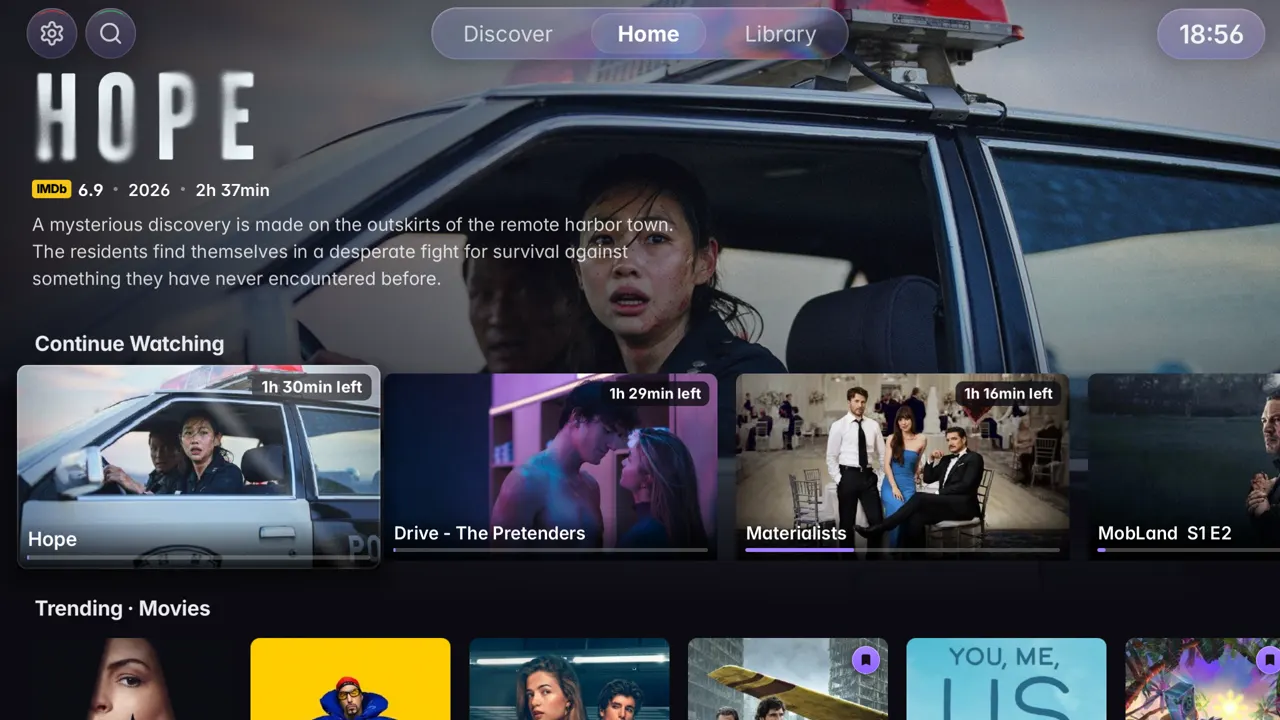
Install
About 5 minutes with the Homebrew Channel, 15 with a computer.
With the Homebrew Channel
The Homebrew Channel is only on LG TVs set up with the webOS Homebrew tools. TV not rooted? Use the computer way below.
- On the TV, open the Homebrew Channel from your apps.
- Search for Stremio Origin and choose Install.
- Not in the list? Open the channel’s Settings, choose Repositories, add
https://stremio-origin.github.io/webos/apps.jsonand search again. - Open Stremio Origin from your apps and sign in with your Stremio account.
With a computer
For any LG TV on webOS 3 or later. You need a computer on the same Wi‑Fi as the TV.
- On the TV, open the LG Content Store, search for Developer Mode and install it.
- Open Developer Mode and sign in with an LG developer account. You can make one in a few minutes on webostv.developer.lge.com.
- Turn Dev Mode Status on. The TV restarts.
- Open Developer Mode again and turn Key Server on. Leave this screen open: it shows the TV’s IP address and a passphrase.
- On the computer, download the
.ipkfile from GitHub Releases, then install Device Manager for webOS. - In Device Manager, choose Add Device and type the IP address and the passphrase from the TV.
- Choose Install, pick the
.ipkfile and wait until it finishes. - On the TV, open Stremio Origin and sign in with your Stremio account.
Good to know
- Developer Mode turns itself off after a while and removes the apps installed with it. Open the Developer Mode app now and then and press Extend.
- New versions: the app tells you, and the Homebrew Channel shows Update.
Compatibility
LG TVs on webOS 3 or later. Developed and tested on webOS 4.4, and reported working on webOS 4 to 25.
Updates
When a new version is out, the app tells you and the Homebrew Channel shows Update on Stremio Origin.
Features
- Seek previewsPictures of the film on the seek bar, on debrid and direct links.
- Phone to TVPlays what you send from the Android app, and the phone becomes its remote.
- CollectionsA franchise’s films in order, and the next film after the credits.
- Audio and subtitles per showEach show remembers your picks, with forced-only subtitles and the original language by default.
- Styled subtitlesFonts, Arabic too, with size, colour, position, brightness and sync.
- Live TVChannels and sports from your addons, with Favorites, Recent and a preview as you browse.
- TraktSign in with a code. What you watch goes to Trakt, with its rows and watched marks.
- Best streamIn one press, or pick from a sources tray for each addon.
- Next episodeSkip intro and recap, auto-play, and a next-episode card in two sizes.
- ChaptersNamed on the seek bar when the file names them.
- Spoilers blurredAnd upcoming episodes on Home.
- Trailer behind HomeThe title in focus plays its trailer behind Home.
- Dolby VisionWhere the TV supports it.
- Surround soundDTS converted on the TV.
- Picture sizeOriginal, fill or zoom.
- RemoteThe pointer hides when idle, and OK presses what you point at.
- Your Stremio accountYour addons, Library, watched state and Continue Watching, in sync.
- Viewer noticeAge rating and the reasons, from the IMDb Parents Guide.
- 28 languagesArabic included, right to left, with titles and descriptions in your language.
- Updates and logsUpdates from inside the app or the Homebrew Channel. Share logs gives a short code for an issue.
- PrivateNo analytics, and nothing is sent to the developer.
What users say
the smoothness and overall feel of the app is amazing.
MaelstromOComg! who knew LG WebOS application could be this buttery smooth !?!?!!
monster_lurkerIt's so fast and fluid.
DizzieeDoeYou clearly know what good UX looks like.
w_petyaPERFECT!!
Miserable-Mud7310Full of features and is so much better than the original app.
murphyzgIt’s sooooooooo goood!! Congrats
seriouslyaleksBeen waiting for something like this for so long.
dondraper65DAAAAAMN! THIS TOTALLY CHANGED MY EXPERIENCE.
Worldly-Perception74Best app i even seen on this subreddit!!!
CompetitionTop4253loving the interface so far, super pretty
Redfrog4It works like a charm 🥳🥰
FoxinouIt’s a world apart from the original.
valentinBochOMG I LOVE IT MAN
MasterPriority1398Man this app saves the day, really great job !
vesnikletaGreat work this is awesome works perfect
Efficient-Focus2264Ottimo complimenti davvero un bel lavoro grazie!
RudyReefbadass! so smooth.
DMNDRECORDSthe dedicated subs screen like the pc version is amazing
Mikocheru
The app works like a charm.
SkraevskjoldFantastic app working perfectly
TrueSapienThis app looks great, just installed it. Good work 👍👏
DEVIL_S1NGHI saw this, fallowed and installed, it is perfect!!!
HugobciYou app is incredible. Very well done.
Far-Cartographer291Bro. just an amazing work!
Disastrous-Beat302I loved it!
Givanilson_ReisThis is awesome!
DjoezieIt's incredibly fast, better then the original app
Secret_Bug_9795I really appreciate your work and your contribution.
CESS502Works amazing
erd159it's quiet fast, I love it.
batmanrises123It is too good.
nobodydikthe speedtest feature is genius.
RenderedKnavegreat app.
brownbear1986I think the app is pretty damn good, starred the repo👍
Whole_Wafer7251amazing work!
thevhsgamerL’app è velocissima.
gl3nn88Great work!
Little_Possible2857